690浏览
690浏览
一、问题背景
最近两天系统出现CPU使用率异常升高的情况,我们已第一时间采取应急措施,包括临时关闭JSF、摘除流量并重启服务,当前问题已得到初步缓解。
为彻底定位根因,在保障业务不受影响的前提下,我们结合CPU余量空间,对线程快照进行了抽样分析。
通过监控告警数据显示,该系统CPU使用率持续处于高位,且系统负载在16分钟内两次超过预警阈值,说明存在明显的性能瓶颈或潜在故障风险。
二、问题现象
2.1 2025.12.03 CPU超过61次使用率>20%
2025年12月1号,下午18:56,当时在开会,突然收到netty服务CPU告警,紧急对现场进行保护,下jsf,并摘流量重启,同时对现场进行采样,对机器进行了重启,重启之后服务就正常了。
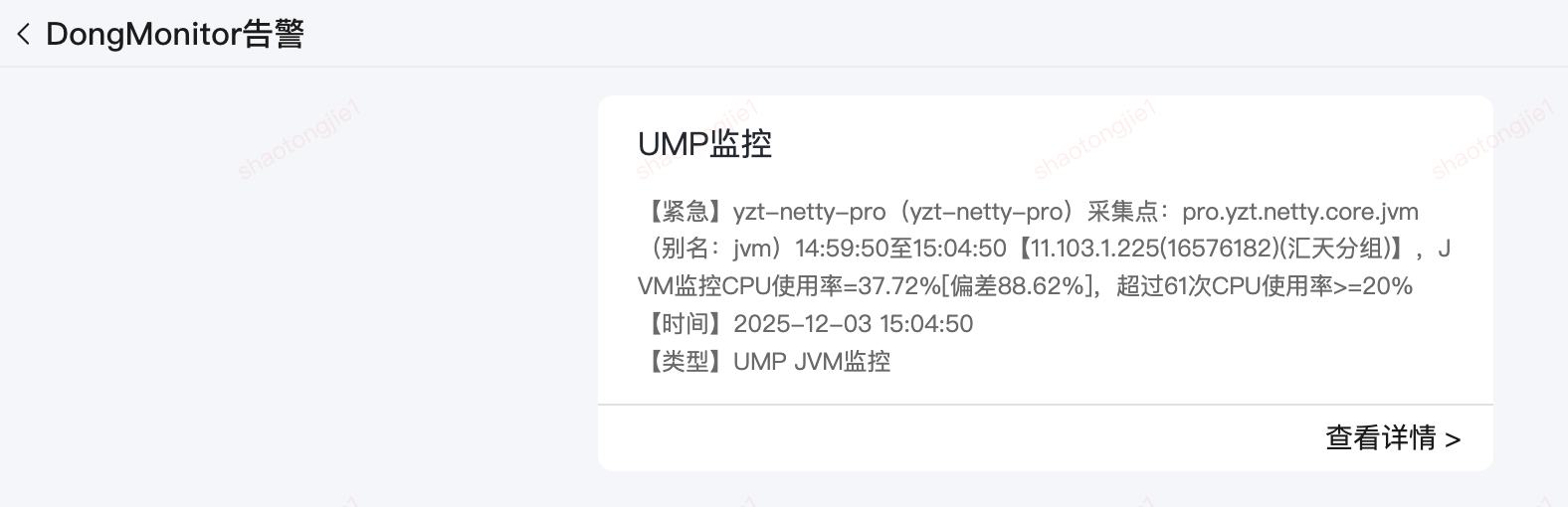
2.2.1 UMP监控告警
【紧急】yzt-netty-pro(yzt-netty-pro)
采集点:pro.yzt.netty.core.jvm(别名:jvm)14:59:50至15:04:50
【11.103.1.225(16576182)(汇天分组)】,JVM监控CPU使用率=37.72%[偏差88.62%],超过61次CPU使用率>=20%
【时间】2025-12-03 15:04:50
【类型】UMP JVM监控
2.2 2025.12.01 CPU使用率连续15分钟>60%
2025年12月3号,下午15:04:50,当时cpu持续在37%下不来,在采样线程dump下来之后,重启之后服务正常了。
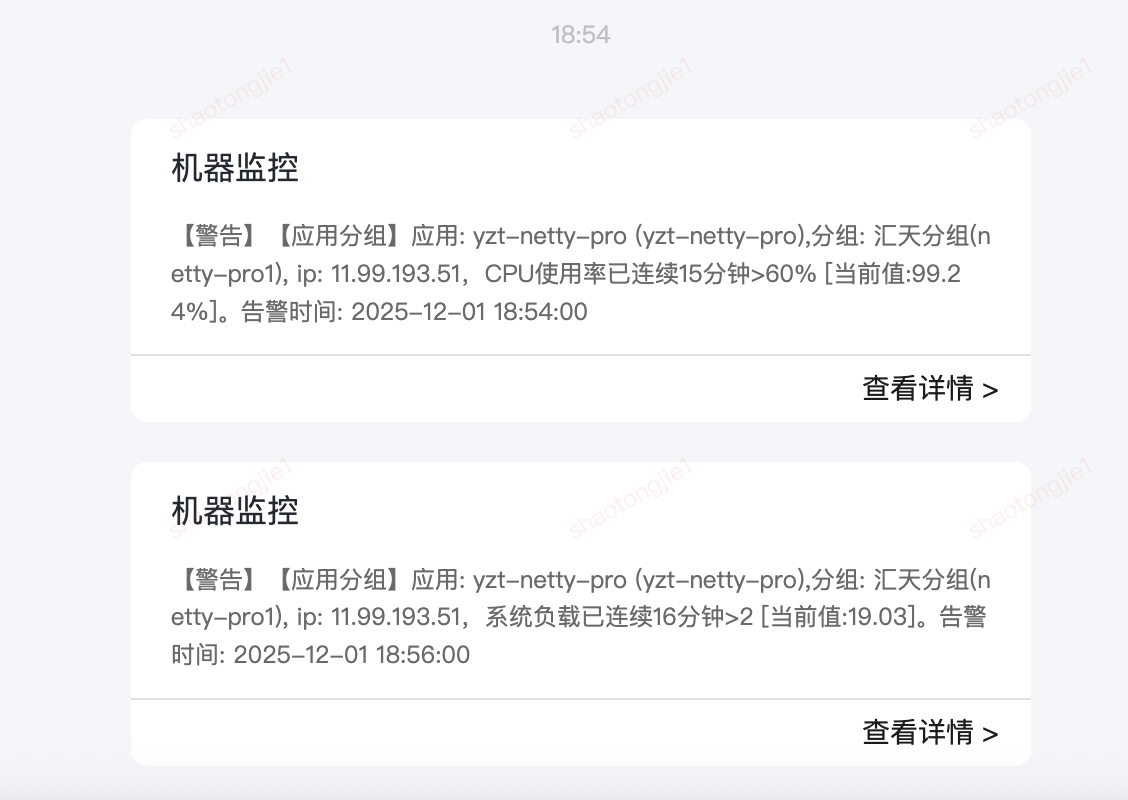
2.2.1 CPU告警
【警告】【应用分组】
应用: yzt-netty-pro (yzt-netty-pro),
分组: 汇天分组(netty-pro1),
ip: 11.99.193.51,CPU使用率已连续15分钟>60% [当前值:99.24%]。
告警时间: 2025-12-01 18:54:00
2.1.2 系统负载告警
【警告】【应用分组】
应用: yzt-netty-pro (yzt-netty-pro),
分组: 汇天分组(netty-pro1),
ip: 11.99.193.51,系统负载已连续16分钟>2 [当前值:19.03]。
告警时间: 2025-12-01 18:56:00
三、排查过程
3.1 紧急救火
3.1.1 下JSF,摘流量
- 定位异常实例:通过监控平台锁定CPU持续飙高的机器IP
- 流量摘除:
- 将该实例从JSF下线
- 观察监控确认流量已降为0
- 服务重启:在确认无流量状态后,对异常实例执行重启操作,临时恢复服务可用性

通过对应的ip观察流量为0的时候,对服务进行重启
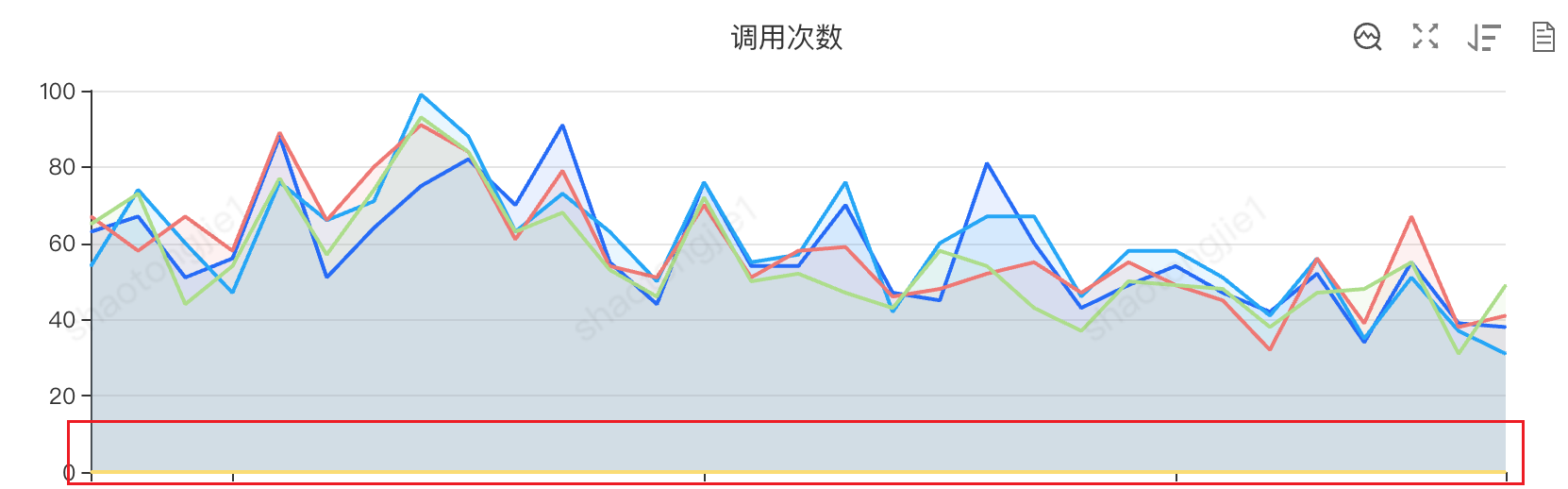
3.1.2 对线程快照采样
在不中断业务的前提下,对问题实例进行线程快照采样,为后续根因分析保留第一手现场数据。

3.2 方式一:命令行分析
排查在2025.12.03 CPU超过61次使用率>20%
3.2.1 初步定位
登录问题服务器,使用基础监控命令进行初步排查:
# 1. 查看系统整体CPU使用情况
$ top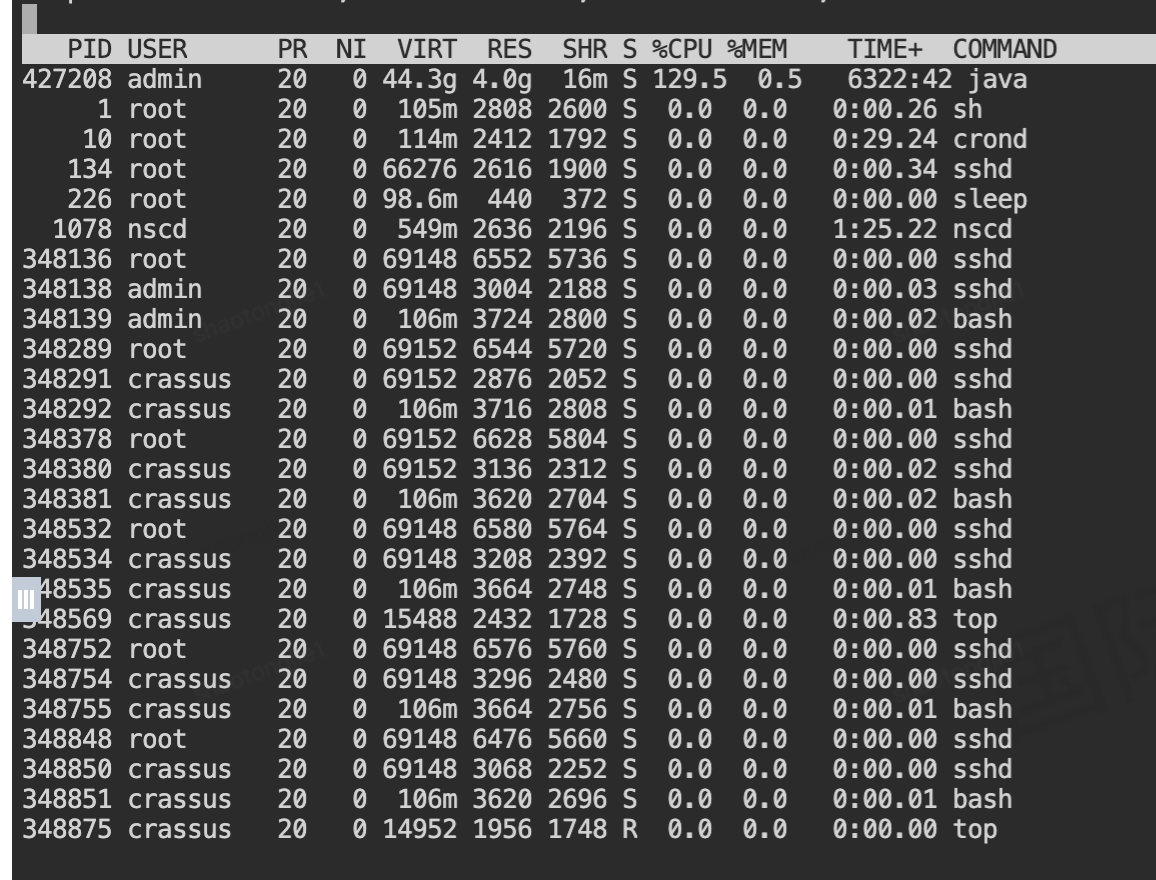
关键发现:
- Java进程PID 427208占用CPU高达129.5%
- 该进程已运行6322分钟,说明是长时间运行的服务进程
- 内存占用4.0G,属于正常范围
PID USER      PR  NI  VIRT  RES  SHR S %CPU %MEM    TIME+  COMMAND
427208 admin     20   0 44.3g 4.0g  16m S 129.5  0.5   6322:50
3.2.2 定位问题线程
既然确定是Java进程导致CPU飙高,下一步需要分析是哪个具体线程在消耗CPU资源:
# 查看指定进程内各线程的CPU使用情况
$ top -H -p 427208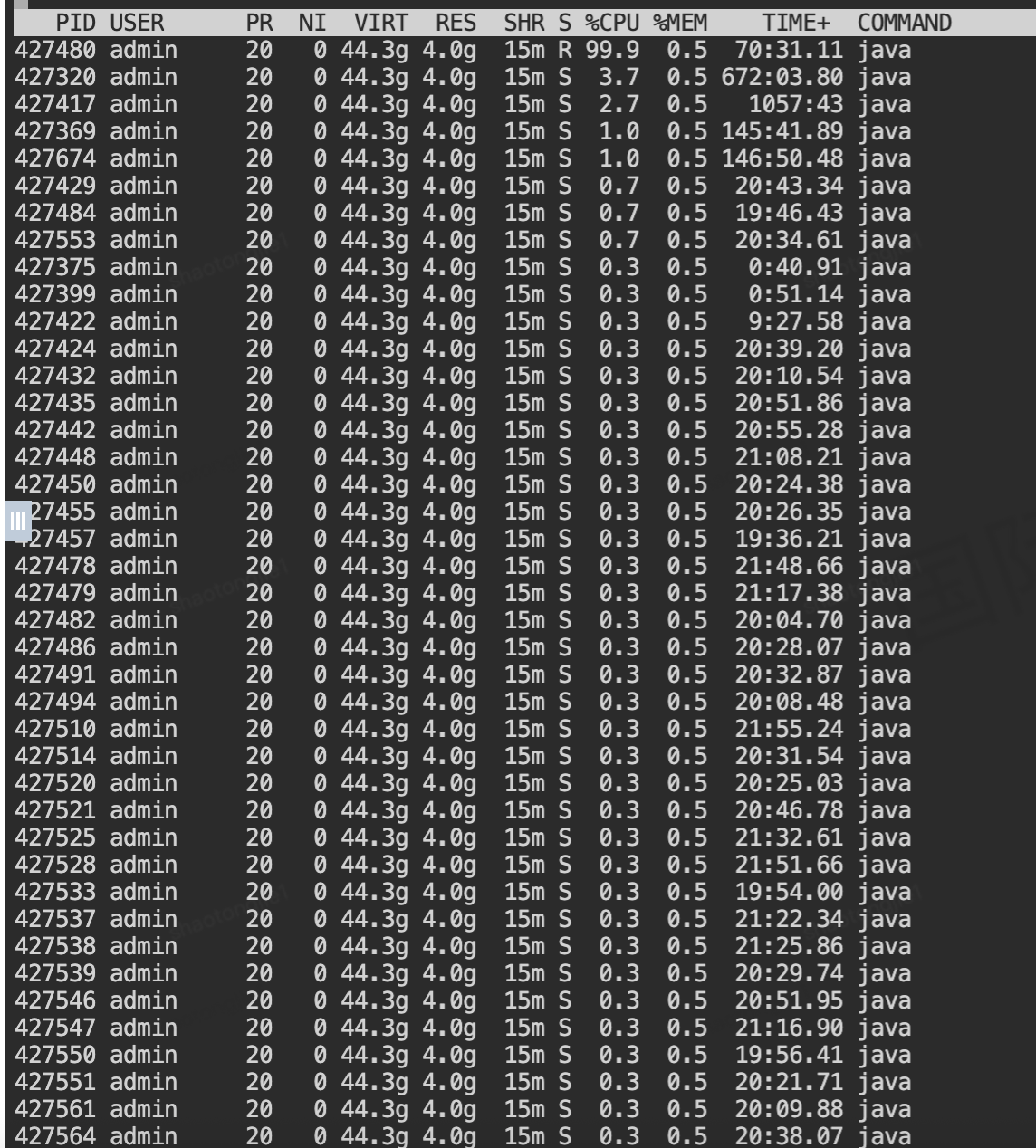
线程级分析结果:
 PID USER      PR  NI  VIRT  RES  SHR S %CPU %MEM    TIME+  COMMAND
427480 admin     20   0 44.3g 4.0g  15m R 99.9  0.5  70:43.13 java
427417 admin     20   0 44.3g 4.0g  15m S  4.6  0.5   1057:43 java
427320 admin     20   0 44.3g 4.0g  15m S  4.0  0.5 672:04.32 java
关键发现:
- 线程PID 427480独占99.9%的CPU,是主要问题根源
- 该线程状态为R(运行中),且已运行70分钟
- 其他几个线程也有较高的CPU占用,但相对较低
3.2.3 线程ID转换十六进制
为了在Java线程堆栈中定位问题线程,需要将操作系统线程ID转换为十六进制:

$ printf "%x\n" 427480
685d8
转换结果: 十进制427480 → 十六进制0x685d8
这个十六进制值就是Java线程堆栈中的nid(native thread ID)。
3.2.4 获取线程堆栈信息
生成线程转储
通过jstack命令获取完整的线程堆栈信息:
# 生成线程转储文件
$ jstack -l 427208 > thread_dump_$(date +%Y%m%d_%H%M%S).log在生成的thread_dump文件中搜索nid=0x685d8:
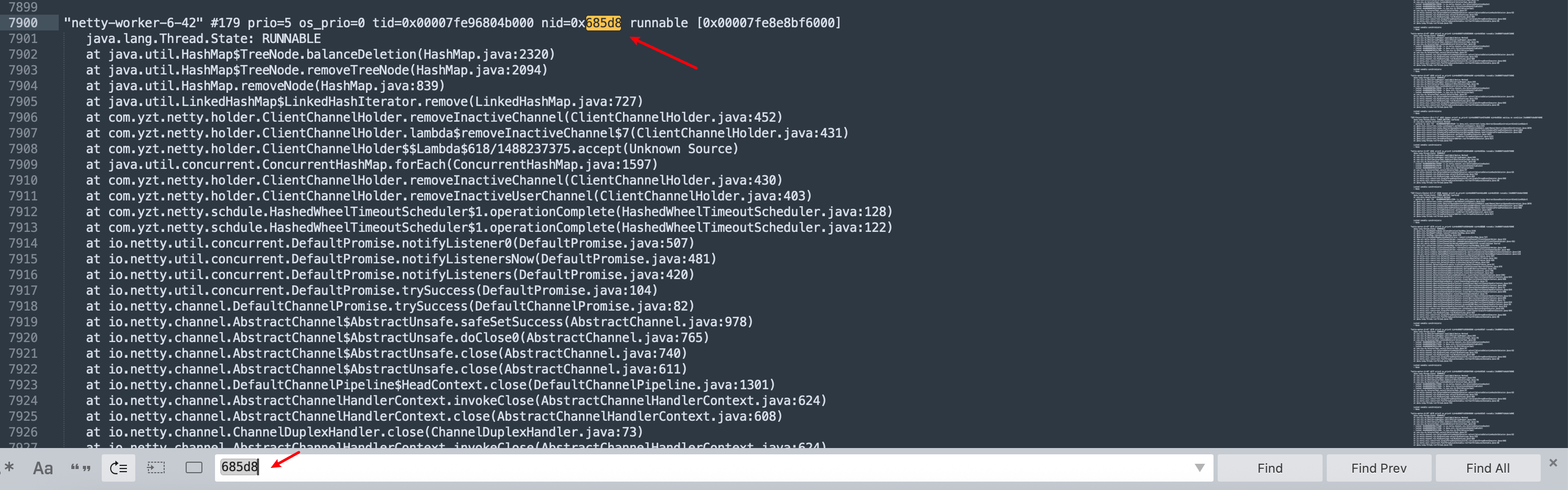
"netty-worker-6-42" #179 prio=5 os_prio=0 tid=0x00007fe96804b000 nid=0x685d8 runnable [0x00007fe8e8bf6000]
   java.lang.Thread.State: RUNNABLE
    at java.util.HashMap$TreeNode.balanceDeletion(HashMap.java:2320)
    at java.util.HashMap$TreeNode.removeTreeNode(HashMap.java:2094)
    at java.util.HashMap.removeNode(HashMap.java:839)
    at java.util.LinkedHashMap$LinkedHashIterator.remove(LinkedHashMap.java:727)
    at com.yzt.netty.holder.ClientChannelHolder.removeInactiveChannel(ClientChannelHolder.java:452)
    at com.yzt.netty.holder.ClientChannelHolder.lambda$removeInactiveChannel$7(ClientChannelHolder.java:431)
    at com.yzt.netty.holder.ClientChannelHolder$$Lambda$618/1488237375.accept(Unknown Source)
    at java.util.concurrent.ConcurrentHashMap.forEach(ConcurrentHashMap.java:1597)
    at com.yzt.netty.holder.ClientChannelHolder.removeInactiveChannel(ClientChannelHolder.java:430)
    at com.yzt.netty.holder.ClientChannelHolder.removeInactiveUserChannel(ClientChannelHolder.java:403)
    at com.yzt.netty.schdule.HashedWheelTimeoutScheduler$1.operationComplete(HashedWheelTimeoutScheduler.java:128)
    at io.netty.util.concurrent.DefaultPromise.notifyListener0(DefaultPromise.java:507)
    at io.netty.util.concurrent.DefaultPromise.trySuccess(DefaultPromise.java:104)
    at io.netty.channel.AbstractChannel$AbstractUnsafe.close(AbstractChannel.java:740)
线程状态分析
- 线程名称: netty-worker-6-42 - Netty工作线程池中的第6组第42号线程
- 线程状态: RUNNABLE - 正在执行Java代码
- 阻塞状态: [0x00007fe8e8bf6000] - 线程栈内存地址
3.2.5 日志调用链剖析:
通过对堆栈的逐层分析,可以还原完整的调用路径:
1. Netty通道关闭事件触发
   ↓
2. HashedWheelTimeoutScheduler回调执行
   ↓
3. ClientChannelHolder.removeInactiveUserChannel() 调用
   ↓
4. ClientChannelHolder.removeInactiveChannel() 遍历清理
   ↓
5. ConcurrentHashMap.forEach() 并行遍历
   ↓
6. LinkedHashMap$LinkedHashIterator.remove() 迭代器删除
   ↓
7. HashMap.removeNode() 执行节点删除
   ↓
8. HashMap$TreeNode.balanceDeletion() 红黑树再平衡 ← CPU消耗点
根据日志得出初步结论
1. 并发访问冲突:使用ConcurrentHashMap.forEach()进行并行遍历
2. 非线程安全操作:在遍历过程中调用LinkedHashMap.remove()方法
3. 红黑树再平衡:HashMap在删除节点时进行红黑树的平衡调整,这是CPU密集型操作
3.2.6 业务代码分析
根据日志定位业务代码段,发现是21年的历史代码了
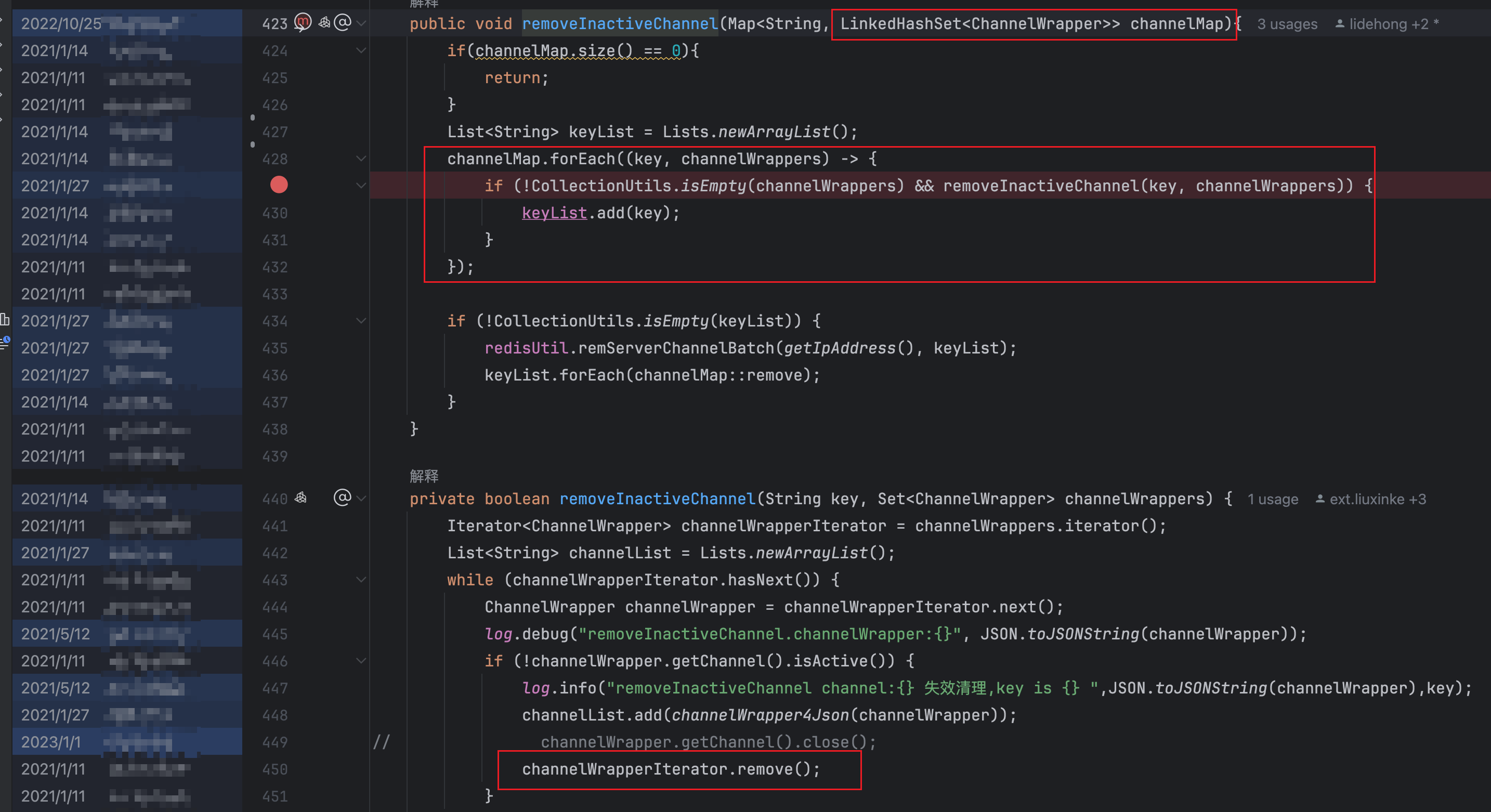
public void removeInactiveChannel(Map<String, LinkedHashSet<ChannelWrapper>> channelMap) {
    List<String> keyList = Lists.newArrayList();
    // 问题点:使用forEach进行并行遍历
    channelMap.forEach((key, channelWrappers) -> {
        if (!CollectionUtils.isEmpty(channelWrappers) &&
            removeInactiveChannel(key, channelWrappers)) {
            keyList.add(key);
        }
    });
    if (!CollectionUtils.isEmpty(keyList)) {
        redisUtil.remServerChannelBatch(getIpAddress(), keyList);
        keyList.forEach(channelMap::remove);
    }
}
private boolean removeInactiveChannel(String key, Set<ChannelWrapper> channelWrappers) {
    Iterator<ChannelWrapper> channelWrapperIterator = channelWrappers.iterator();
    List<String> channelList = Lists.newArrayList();
    while (channelWrapperIterator.hasNext()) {
        ChannelWrapper channelWrapper = channelWrapperIterator.next();
        if (!channelWrapper.getChannel().isActive()) {
            channelList.add(channelWrapper4Json(channelWrapper));
            // 危险操作:在迭代过程中删除元素
            channelWrapperIterator.remove();  // ← 这里调用了LinkedHashSet.remove()
        }
    }
    // ... 后续Redis操作
    return CollectionUtils.isEmpty(channelWrappers);
}
3.2.7 结论
2025.12.03 CPU超过61次使用率>20%,LinkedHashSet.remove调用链路分析
LinkedHashSet.remove(Object o)
    ↓ 调用父类方法
HashSet.remove(Object o)
    ↓ 调用HashMap.remove
HashMap.remove(Object key)
    ↓
HashMap.removeNode(int hash, Object key, Object value, boolean matchValue, boolean movable)
    ↓ 如果节点是TreeNode(红黑树节点)
HashMap.TreeNode.removeTreeNode(...)
    ↓ 需要保持红黑树平衡
HashMap.TreeNode.balanceDeletion(...)- 数据结构选择不当:
- 外层使用
ConcurrentHashMap保证线程安全,内层却使用非线程安全的LinkedHashSet - 在多线程环境同时修改
LinkedHashSet会导致内部状态不一致 - 并发修改异常:
ConcurrentHashMap.forEach()支持并发遍历- 但在遍历回调中修改了集合结构,导致
ConcurrentModificationException或更严重的内部数据结构损坏 - HashMap树化操作:
- 当HashMap中链表长度超过8时,会转换为红黑树
- 删除节点时需要进行
balanceDeletion()操作 - 多线程并发修改可能导致红黑树结构损坏,陷入平衡调整的死循环
3.3 方式二:泰山分析
排查 2025.12.01 CPU使用率连续15分钟>60%
3.3.1 分析线程快照JStack内容

还有一种方式是通过DongMinitor实时采集

3.3.2 调用栈分析
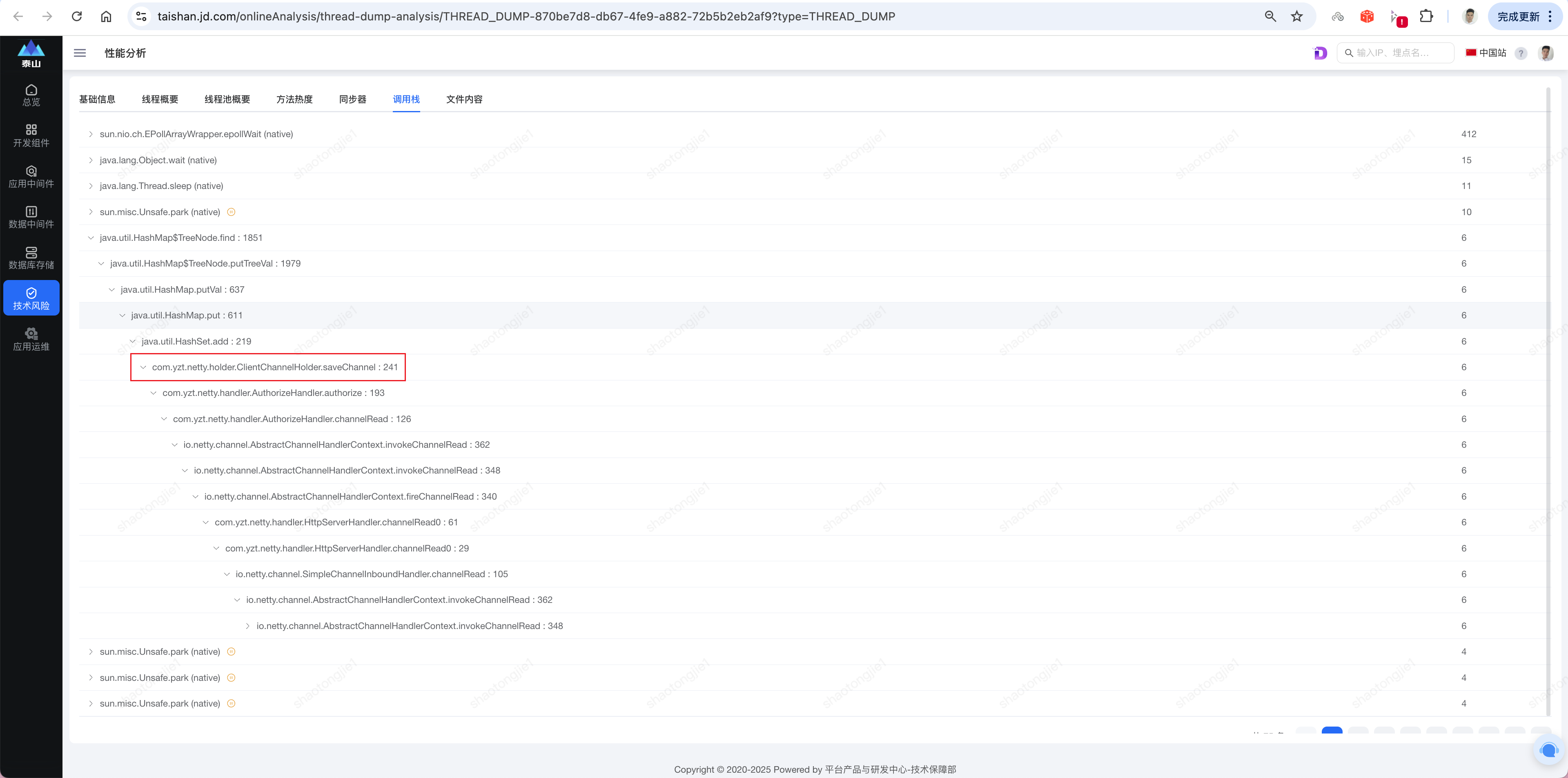
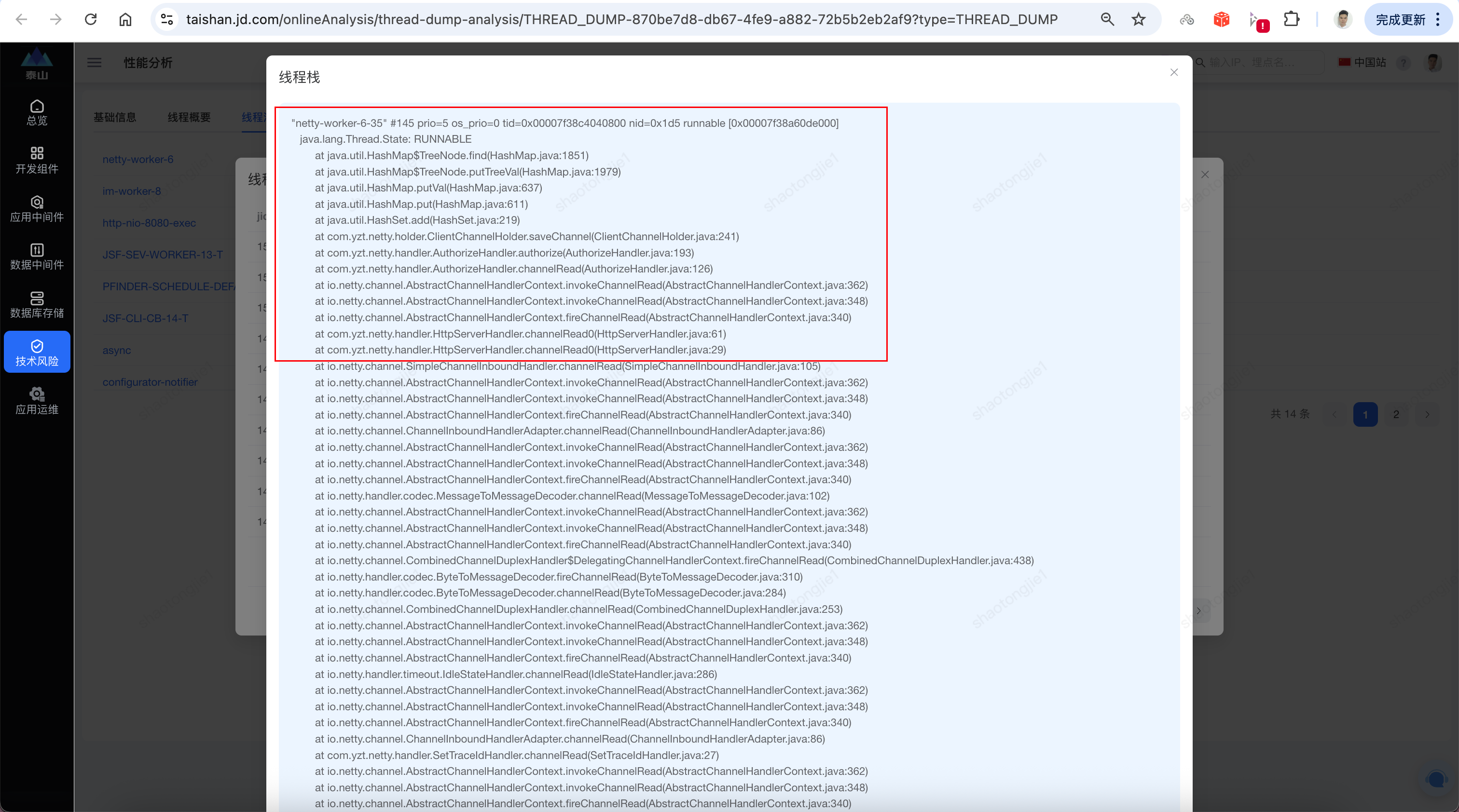
堆栈信息解读
线程名称: "netty-worker-6-35"    # Netty工作线程
线程状态: RUNNABLE               # 正在执行Java代码
问题方法: HashMap$TreeNode.find() # 红黑树查找操作
调用链路:
    HashSet.add() → HashMap.put() → putVal() → putTreeVal() → find()
业务入口: ClientChannelHolder.saveChannel()
3.3.3 业务代码分析
根据异常日志,定位代码段
public void saveChannel(ChannelKeyBuilder channelKeyBuilder, Channel channel, String clientIp) {
        ChannelTypeEnum channelTypeEnum = ChannelTypeEnum.getByCode(channelKeyBuilder.getChannelType());
        if(StringUtils.isEmpty(channelKeyBuilder.getOrgCode()) || !isNumber(channelKeyBuilder.getOrgCode())){
            throw new YZTException(ORGCODE_NOT_EMPTY);
        }
        switch (channelTypeEnum) {
            case USER:
                notNull(channelKeyBuilder.getUserPin(), USER_PIN_NOT_EMPTY);
                String userKey = channelKeyBuilder.buildUserKey();
                // 初始化channel
                LinkedHashSet<ChannelWrapper> userChannelWrappers = userChannels.computeIfAbsent(userKey, k -> Sets.newLinkedHashSet());
                ChannelWrapper userChannelWrapper = buildChannelWrapper(channelKeyBuilder, clientIp, channel);
                // 缓存到Redis
                redisUtil.addChannelInfo(userKey, channelWrapper4Json(userChannelWrapper));
                redisUtil.addServerChannel(userChannelWrapper.getServerIp(), userKey);
                // 缓存到本地
                log.info("用户级别通道-添加本地通道:{}", JSON.toJSONString(userChannelWrapper));
                userChannelWrappers.add(userChannelWrapper);

                // 通道限频控制
                channelLimitDto.setChannelWrappers(userChannelWrappers);
                channelLimitDto.setChannelWrapper(userChannelWrapper);
                channelLimitDto.setTraceId(TraceContext.getTraceId());
                channelLimitDto.setTypeEnum(USER);
                applicationContext.publishEvent(channelLimitDto);*/
                break;
        default:
        throw new IllegalArgumentException(CHANNEL_TYPE_ERROR.getMsg() + channelKeyBuilder.getChannelType());
    }
3.3.4 LinkedHashSet源码分析
系统通过全局静态变量维护用户级Channel缓存:
/**
 * 用户级别channel缓存
* key:orgCode+user+plate
 */
private static final Map<String, LinkedHashSet<ChannelWrapper>> userChannels = Maps.newConcurrentMap();
userChannelWrappers.add(userChannelWrapper);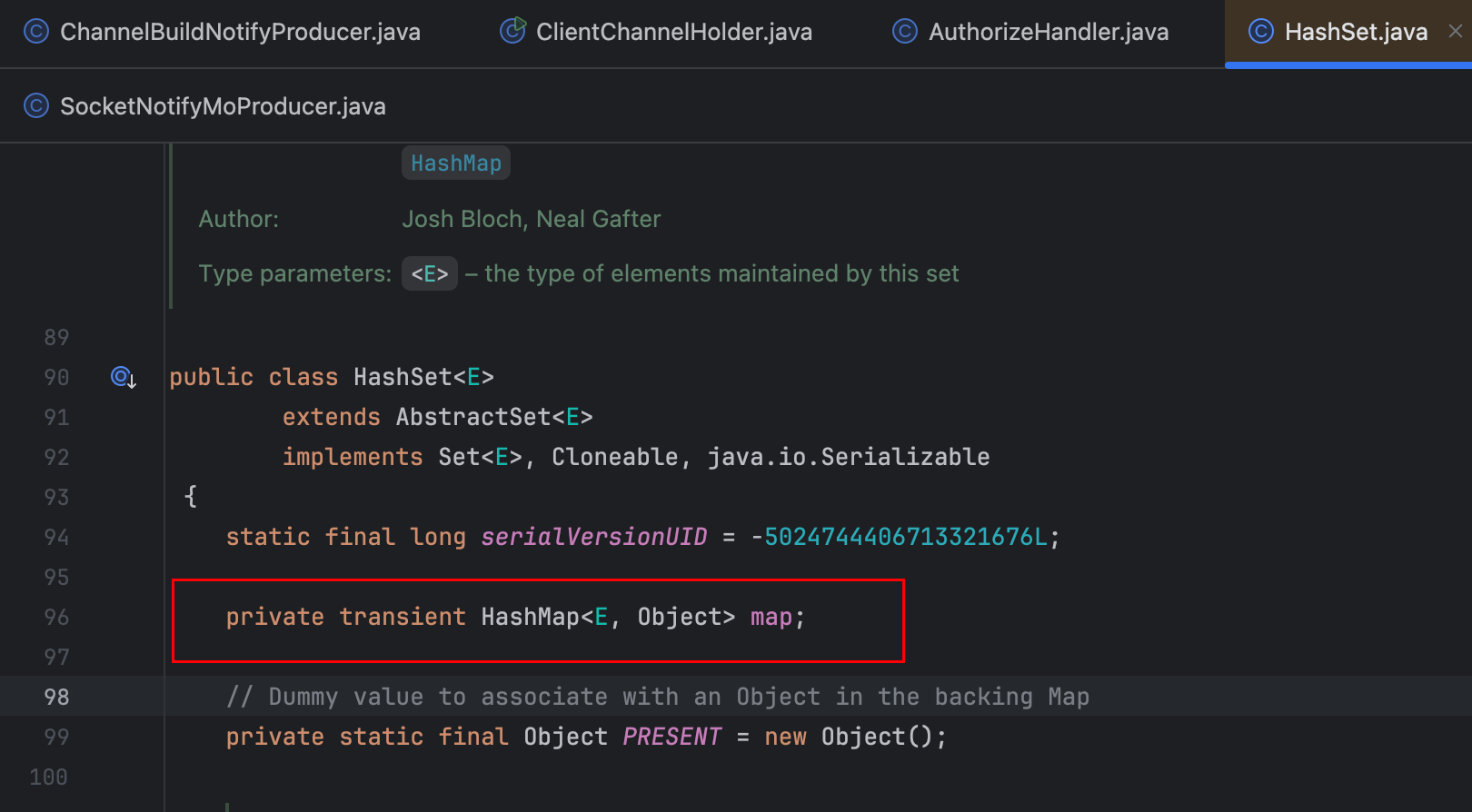
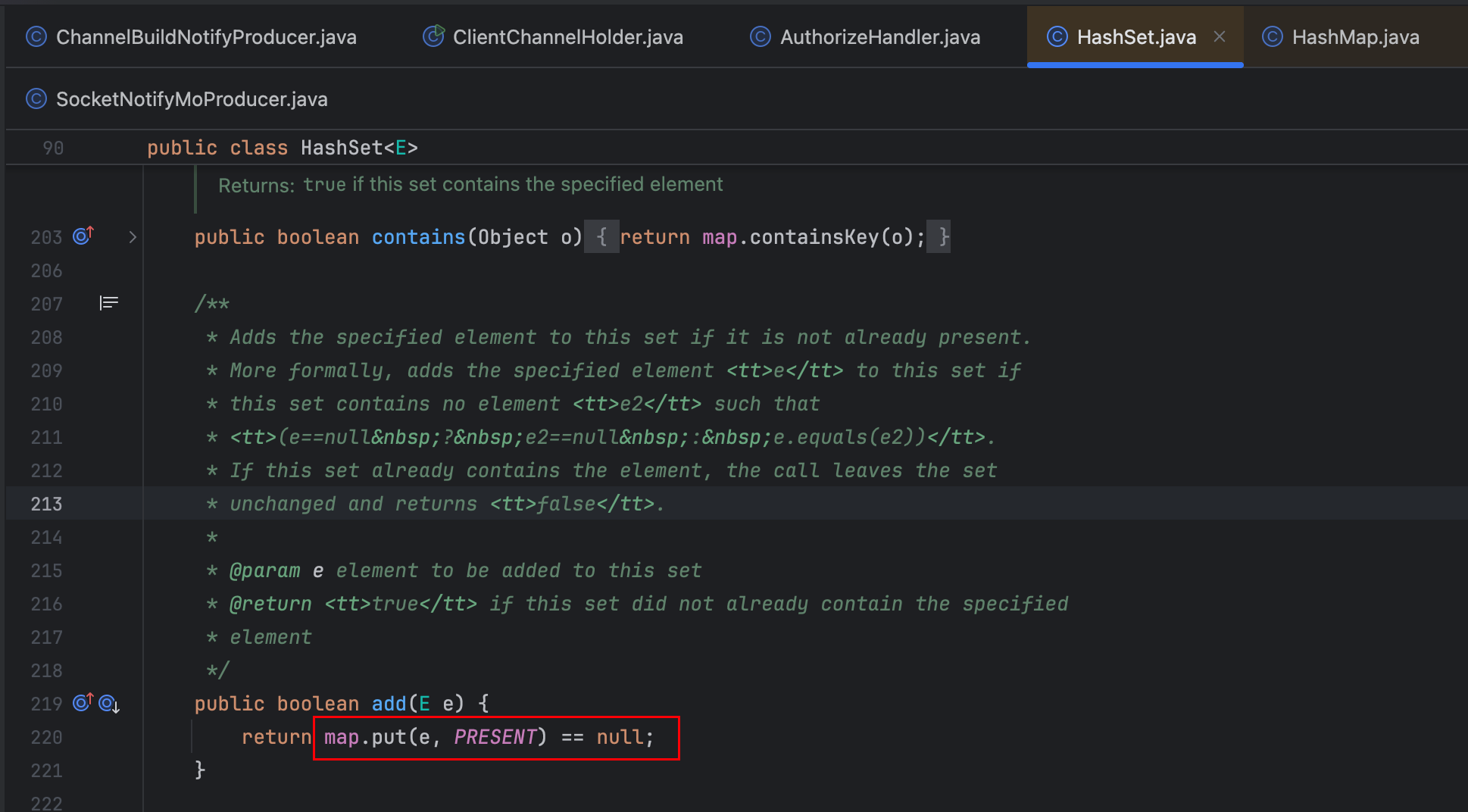
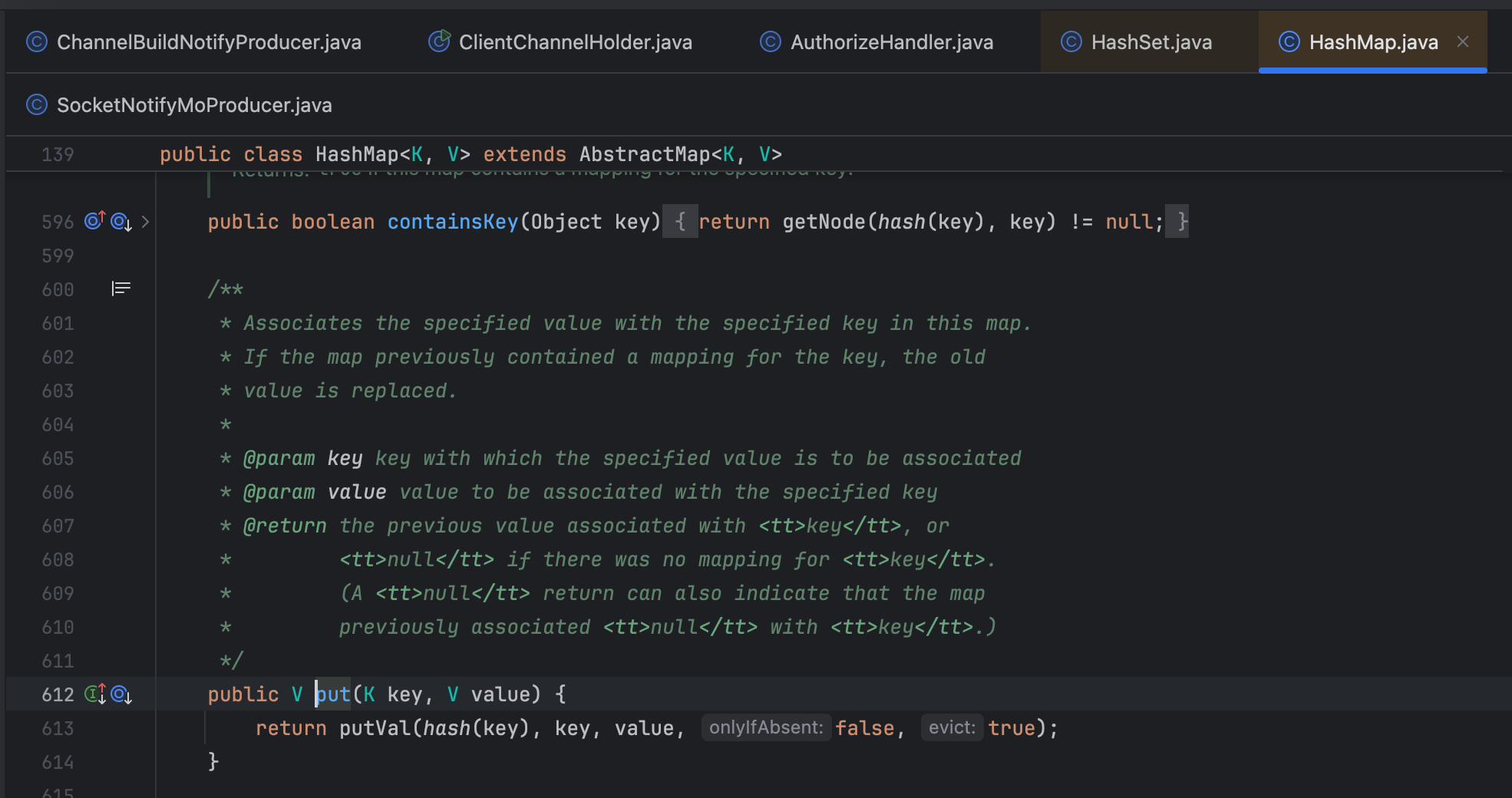
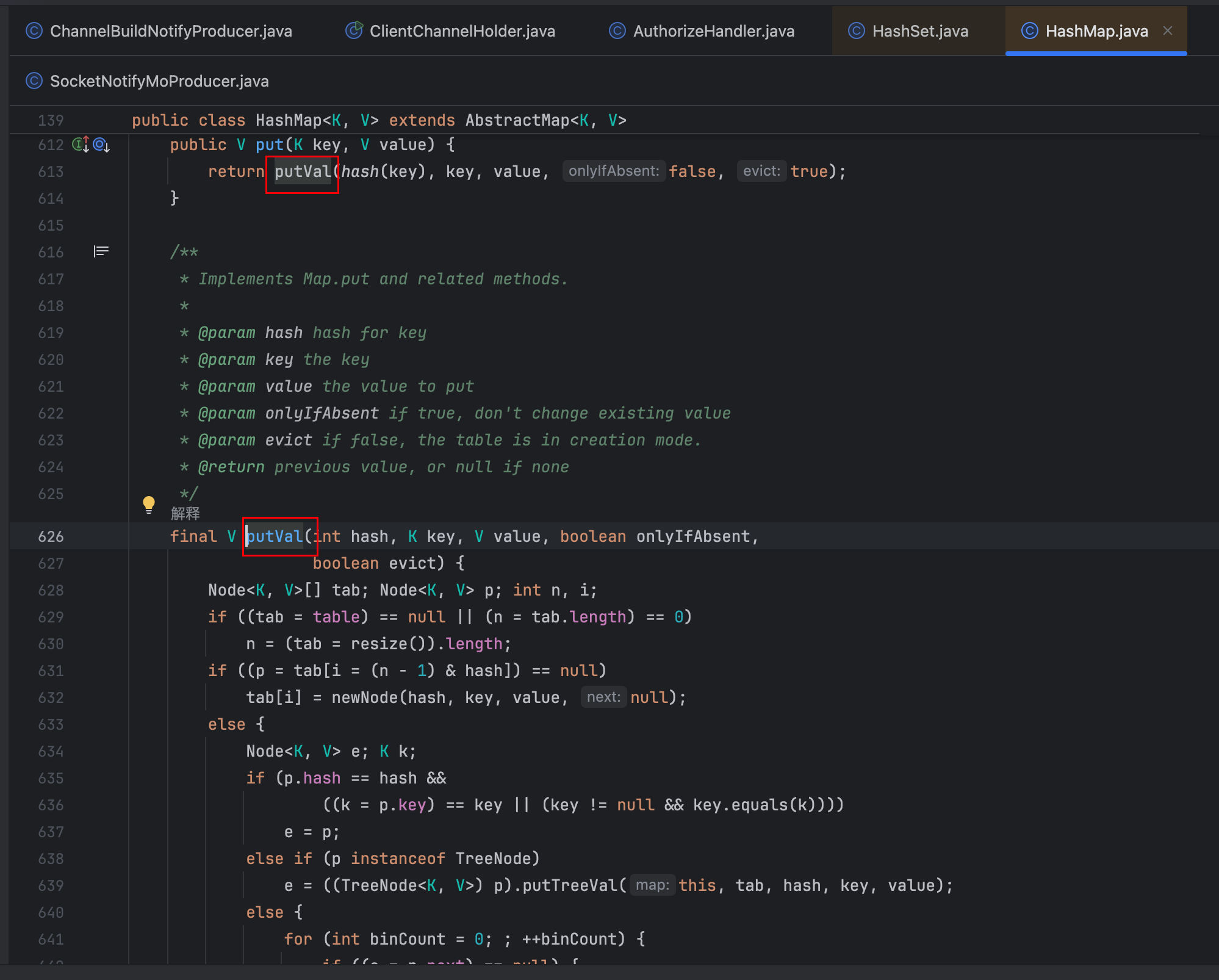
分析关键操作userChannelWrappers.add(userChannelWrapper):
- 外层调用:代码执行的是
LinkedHashSet.add()方法 - 底层实现:
LinkedHashSet内部实际调用的是其父类HashSet的add()方法 - 最终操作:
HashSet.add()本质调用HashMap.put()方法
3.3.4 初步结论
从线程栈看,问题发生在HashMap$TreeNode.find()方法中,这是典型的HashMap在高并发下链表转红黑树后的死循环/性能问题。
具体原因
- 多线程并发场景下的HashMap操作:
netty-worker-6-35是Netty的工作线程- 线程正在执行
ClientChannelHolder.saveChannel()方法 - 该方法内部使用
HashSet.add()→HashMap.put() - 技术层面的问题:
- HashMap非线程安全:HashMap在并发环境下不是线程安全的
- 红黑树查找死循环:当多个线程同时修改HashMap,可能导致红黑树结构损坏
TreeNode.find()方法在损坏的红黑树中可能陷入无限循环- 调用链分析:
AuthorizeHandler.channelRead()
→ AuthorizeHandler.authorize()
→ ClientChannelHolder.saveChannel()
→ HashSet.add()
→ HashMap.put()
→ HashMap.putTreeVal()
→ HashMap$TreeNode.find()  // 卡在这里,在损坏的红黑树中形成环行链表,导致cpu飙高
3.3.5 代码复现
/**
 * @date 2025/12/4 11:31
 * @description: HashMap并发添加导致的CPU飙高演示
 * 模拟Netty工作线程并发保存Channel的场景
 */
public class LinkedHashSetAddDemo {
    // 模拟Channel对象
    static class ChannelWrapper {
        private String channelId;
        private boolean active;

        public ChannelWrapper(String channelId) {
            this.channelId = channelId;
            this.active = true;
        }

        public String getChannelId() {
            return channelId;
        }

        @Override
        public int hashCode() {
            // 故意制造hash冲突,让HashMap更容易树化
            return channelId.charAt(channelId.length() - 1) % 10;
        }

        @Override
        public boolean equals(Object obj) {
            if (this == obj) return true;
            if (obj == null || getClass() != obj.getClass()) return false;
            ChannelWrapper that = (ChannelWrapper) obj;
            return channelId.equals(that.channelId);
        }
    }

    // 模拟ClientChannelHolder
    static class ClientChannelHolder {
        // 问题代码:使用非线程安全的HashSet
        private final Set<ChannelWrapper> channels = new HashSet<>();
        // private final Set<ChannelWrapper> channels = ConcurrentHashMap.newKeySet(); // 解决方案

        private final AtomicInteger counter = new AtomicInteger(0);

        /**
         * 模拟保存Channel的方法 - 存在并发问题
         */
        public void saveChannel(ChannelWrapper channel) {
            // 这里会触发HashMap.put() -> putTreeVal() -> find()
            boolean added = channels.add(channel);

            if (added) {
                int count = counter.incrementAndGet();
                if (count % 1000 == 0) {
                    System.out.println(Thread.currentThread().getName() + " 已添加 " + count + " 个通道");
                }
            }
        }

        public int getChannelCount() {
            return channels.size();
        }

        /**
         * 获取内部HashMap的树化情况(通过反射)
         */
        public void printTreeInfo() {
            try {
                // 反射获取HashSet内部的HashMap
                java.lang.reflect.Field mapField = HashSet.class.getDeclaredField("map");
                mapField.setAccessible(true);
                HashMap<?, ?> map = (HashMap<?, ?>) mapField.get(channels);

                // 获取HashMap的table数组
                java.lang.reflect.Field tableField = HashMap.class.getDeclaredField("table");
                tableField.setAccessible(true);
                Object[] table = (Object[]) tableField.get(map);

                int treeCount = 0;
                int totalBuckets = 0;

                for (Object node : table) {
                    if (node != null) {
                        totalBuckets++;
                        if (node.getClass().getName().contains("TreeNode")) {
                            treeCount++;

                            // 进一步获取树的高度
                            java.lang.reflect.Field parentField = node.getClass().getDeclaredField("parent");
                            parentField.setAccessible(true);
                            Object root = node;

                            // 找到根节点
                            while (parentField.get(root) != null) {
                                root = parentField.get(root);
                            }

                            // 计算树高度(简化版)
                            int height = calculateTreeHeight(root);
                            System.out.println("发现红黑树,高度: " + height);
                        }
                    }
                }

                System.out.println("HashMap统计:");
                System.out.println("  总桶数: " + totalBuckets);
                System.out.println("  红黑树桶数: " + treeCount);
                System.out.println("  树化比例: " + (treeCount * 100.0 / totalBuckets) + "%");

            } catch (Exception e) {
                e.printStackTrace();
            }
        }

        private int calculateTreeHeight(Object node) throws Exception {
            if (node == null) return 0;

            java.lang.reflect.Field leftField = node.getClass().getDeclaredField("left");
            java.lang.reflect.Field rightField = node.getClass().getDeclaredField("right");
            leftField.setAccessible(true);
            rightField.setAccessible(true);

            Object left = leftField.get(node);
            Object right = rightField.get(node);

            return 1 + Math.max(calculateTreeHeight(left), calculateTreeHeight(right));
        }
    }

    // 模拟AuthorizeHandler
    static class AuthorizeHandler {
        private final ClientChannelHolder holder;

        public AuthorizeHandler(ClientChannelHolder holder) {
            this.holder = holder;
        }

        /**
         * 模拟授权方法,多个线程会调用此方法
         */
        public void authorize(String channelId) {
            ChannelWrapper channel = new ChannelWrapper(channelId);
            holder.saveChannel(channel);
        }
    }

    public static void main(String[] args) throws Exception {
        System.out.println("=== HashMap并发添加CPU飙高演示 ===");
//        System.out.println("进程ID: " + ProcessHandle.current().pid());
        System.out.println("按 Ctrl+C 停止程序");
        System.out.println();

        // 创建共享的ChannelHolder
        ClientChannelHolder holder = new ClientChannelHolder();
        AuthorizeHandler handler = new AuthorizeHandler(holder);

        // 监控线程:打印CPU和状态信息
        Thread monitorThread = new Thread(() -> {
            while (true) {
                try {
                    Thread.sleep(3000);
                    System.out.println("\n=== 监控报告 ===");
                    System.out.println("时间: " + new Date());

                    // 打印线程状态
                    System.out.println("活动线程数: " + Thread.activeCount());

                    // 打印添加的Channel数量
                    System.out.println("总Channel数: " + holder.getChannelCount());

                    // 每隔一段时间打印树化信息
                    if (holder.getChannelCount() % 5000 == 0) {
                        holder.printTreeInfo();
                    }

                    // 模拟top命令输出
                    printSimulatedTop();

                } catch (InterruptedException e) {
                    break;
                }
            }
        });
        monitorThread.setDaemon(true);
        monitorThread.start();

        // 创建Netty worker线程池(模拟)
        int workerThreads = 35;  // 对应netty-worker-6-35
        ExecutorService executor = Executors.newFixedThreadPool(workerThreads,
                r -> {
                    Thread t = new Thread(r);
                    t.setName("netty-worker-" + (int) (Math.random() * 10) + "-" +
                            (int) (Math.random() * 50));
                    return t;
                });

        System.out.println("启动 " + workerThreads + " 个工作线程...");

        // 启动工作线程
        for (int i = 0; i < workerThreads; i++) {
            final int threadId = i;
            executor.submit(() -> {
                System.out.println(Thread.currentThread().getName() + " 启动");

                // 模拟持续不断的授权请求
                int requestCount = 0;
                while (true) {
                    try {
                        // 生成Channel ID,故意制造hash冲突
                        String channelId = "channel_" + (threadId * 1000 + requestCount % 100) + "_" + System.currentTimeMillis();// 让不同线程的Channel有相同hash
                        handler.authorize(channelId);
                        requestCount++;
                        // 控制请求速率
                        Thread.sleep(50 + (int) (Math.random() * 100));
                    } catch (Exception e) {
                        System.err.println(Thread.currentThread().getName() +
                                " 异常: " + e.getClass().getSimpleName());
                        if (e instanceof InterruptedException) {
                            break;
                        }
                    }
                }
            });
        }

        // 运行一段时间后停止
        Thread.sleep(120000);  // 运行2分钟

        System.out.println("\n=== 演示结束 ===");
        System.out.println("最终Channel数: " + holder.getChannelCount());
        holder.printTreeInfo();

        executor.shutdownNow();
        executor.awaitTermination(5, TimeUnit.SECONDS);
    }

    private static void printSimulatedTop() {
        // 模拟top命令的CPU显示
        double cpuUsage = 20 + Math.random() * 80;  // 模拟20%-100%的CPU

        System.out.println("模拟CPU使用率: " + String.format("%.1f", cpuUsage) + "%");
        System.out.print("CPU图表: [");

        int bars = (int) (cpuUsage / 2);
        for (int i = 0; i < 50; i++) {
            if (i < bars) {
                if (cpuUsage > 80) {
                    System.out.print("█");  // 红色高CPU
                } else if (cpuUsage > 50) {
                    System.out.print("▓");  // 黄色中等CPU
                } else {
                    System.out.print("░");  // 绿色低CPU
                }
            } else {
                System.out.print(" ");
            }
        }
        System.out.println("]");

        // 模拟线程堆栈
        if (cpuUsage > 85) {
            System.out.println("🚨 检测到高CPU!可能线程堆栈:");
            System.out.println("  java.util.HashMap$TreeNode.find()");
            System.out.println("  java.util.HashMap$TreeNode.putTreeVal()");
            System.out.println("  java.util.HashMap.putVal()");
            System.out.println("  java.util.HashSet.add()");
        }
    }
}
控制台输出
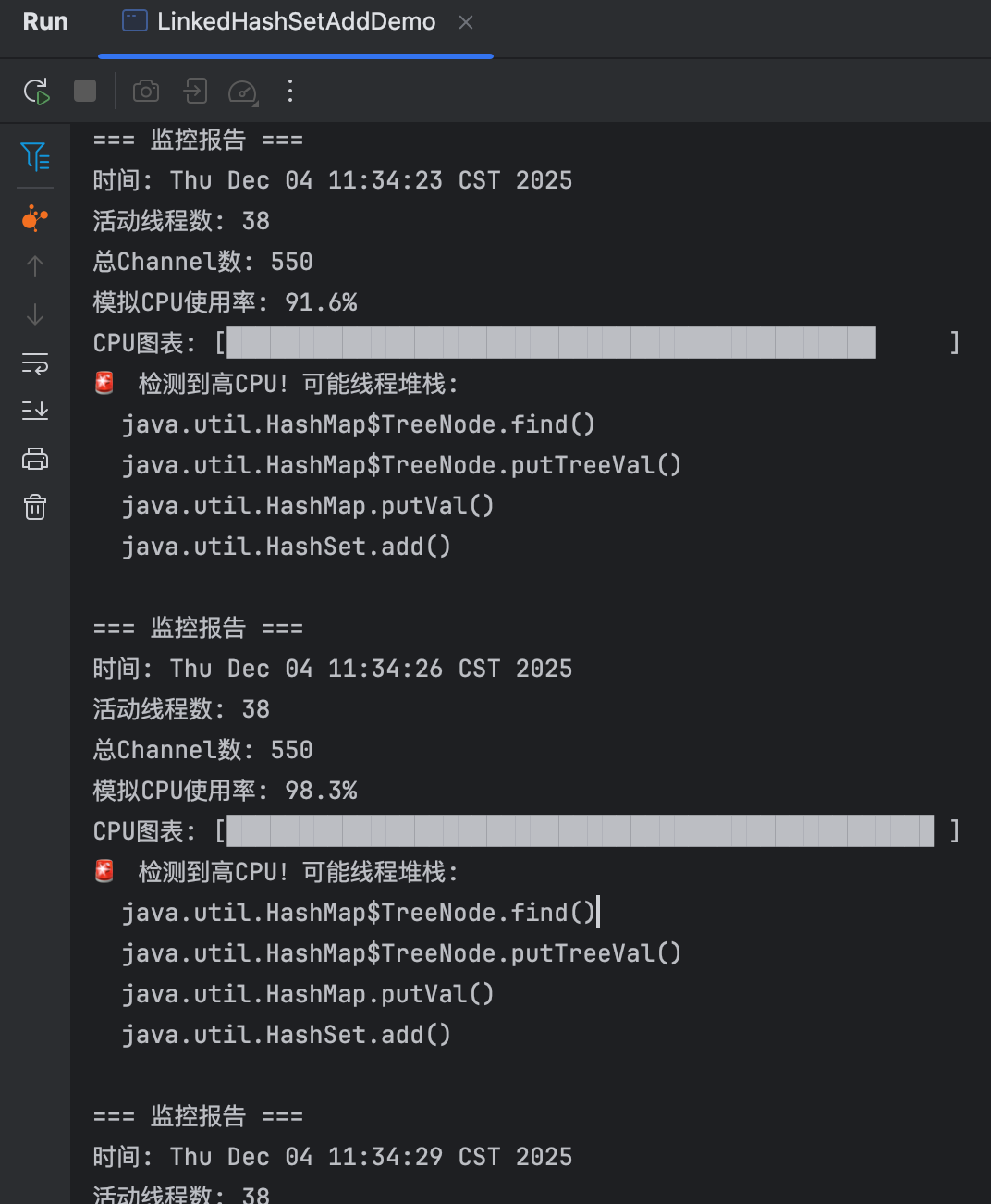
3.5.6 结论
分析结果:2025.12.01 CPU使用率连续15分钟>60%,LinkedHashSet.add操作
- 多个线程同时向同一个HashSet添加元素,HashSet内部使用HashMap实现,当HashMap桶中的链表长度超过8时,会转换为红黑树。
- 红黑树的插入操作需要查找插入位置(find方法),多线程并发插入可能导致红黑树结构损坏,查找进入死循环
3.4 问题总结
LinkHashSet.add()操作
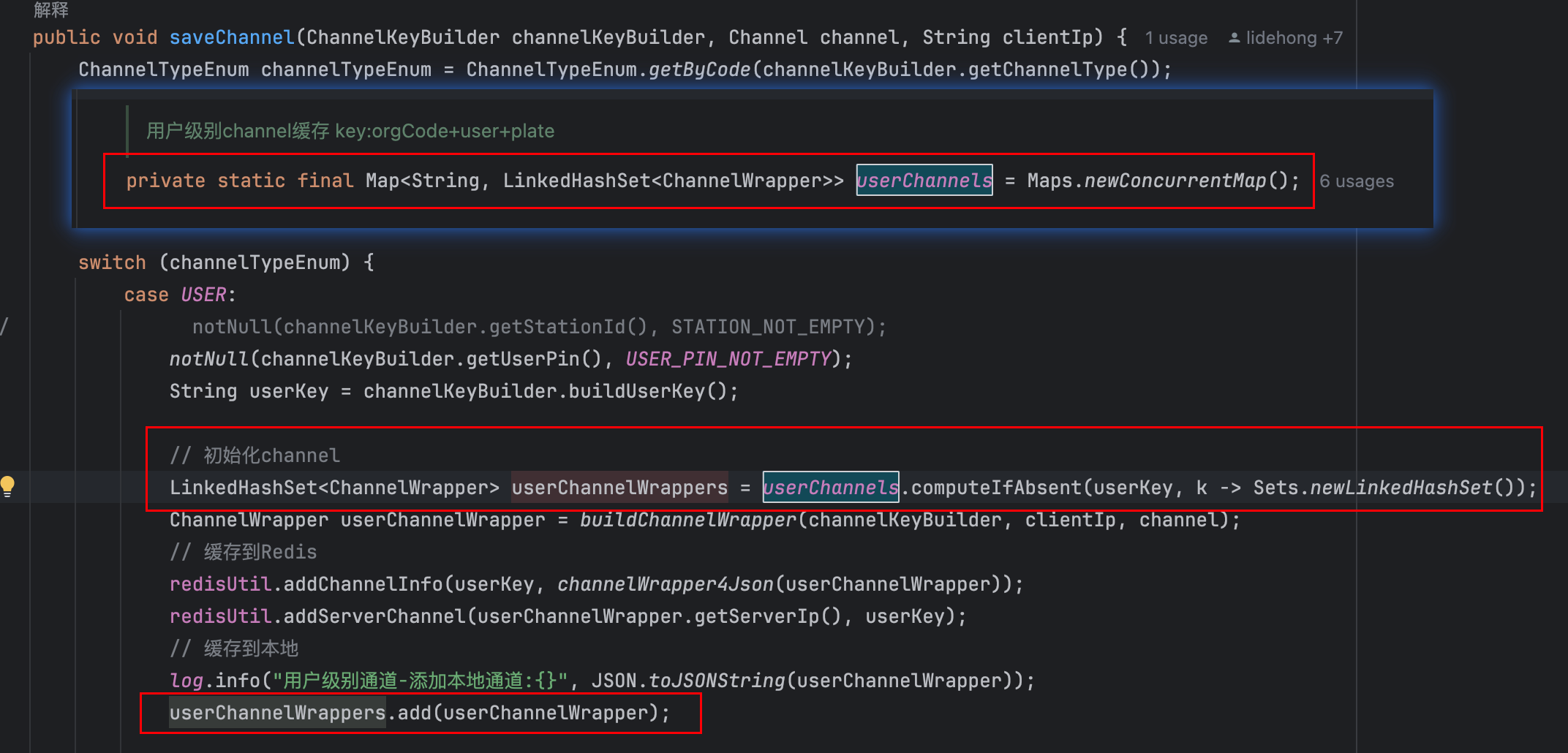
LinkHashSet.remove()操作
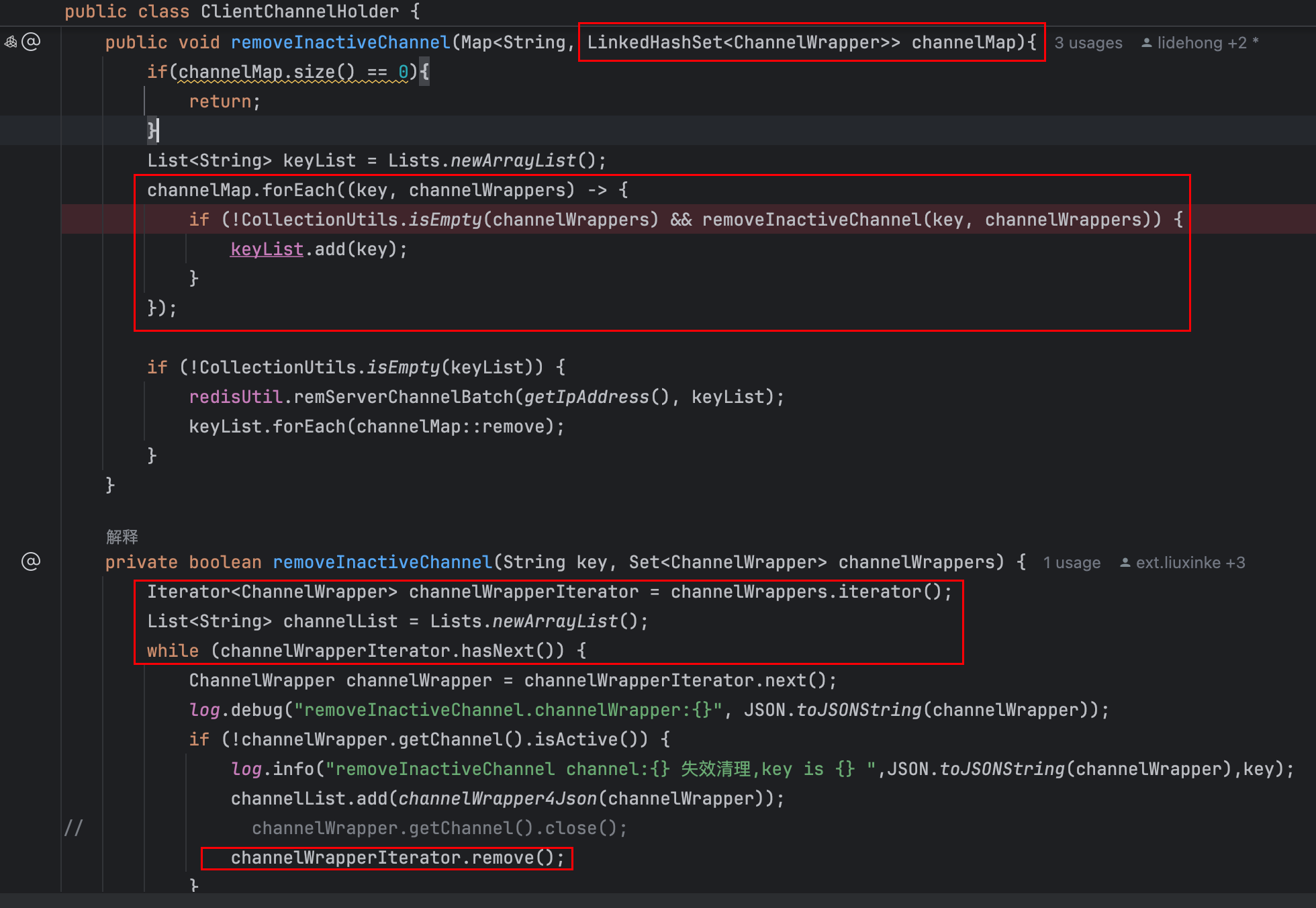
通过两次对CPU使用率异常飙升的分析,最终得出结论:
- 问题的根源在于ClientChannelHolder组件中使用了非线程安全的LinkHashSet集合。
- 在多线程并发操作的环境下,LinkHashSet在执行add()和remove()操作作时存在线程安全问题,导致数据结构的不一致和线程相互占用。
- 引发了频繁的Young GC(年轻代垃圾回收)事件。由于Young GC的频繁触发,JVM需要不断进行内存回收和对象整理,从而显著增加了CPU的负载,最终导致CPU使用率异常飙升。
四、解决方案
4.1 解决方案选择
| 方案 | 并发添加安全性 | 并发删除安全性 | 内存开销 | 性能表现 | 推荐指数 |
| LinkedHashSet + synchronized | ✅ 安全 | ✅ 安全 | 低 | 差(锁竞争) | ⭐⭐ |
| ConcurrentHashMap.newKeySet() | ✅ 安全 | ✅ 安全 | 中 | 优 | ⭐⭐⭐⭐⭐ |
| CopyOnWriteArraySet | ✅ 安全 | ✅ 安全 | 高(写时复制) | 读优写差 | ⭐⭐⭐ |
| Collections.synchronizedSet() | ✅ 安全 | ✅ 安全 | 低 | 中等 | ⭐⭐⭐ |
| ConcurrentLinkedHashMap | ✅ 安全 | ✅ 安全 | 中 | 优(保持顺序) | ⭐⭐⭐⭐ |
选择ConcurrentHashMap.newKeySet()的主要原因:
- 性能最优:分段锁/乐观锁机制,读写高并发时性能远胜
synchronized - 内存友好:相比
CopyOnWriteArraySet无写时复制开销 - 完全线程安全:内置并发控制,无需外部同步
- 适合高频写入:Netty 场景恰好是高频并发写入
其他方案的短板:
synchronizedSet:粗粒度锁,高并发成性能瓶颈CopyOnWriteArraySet:写时复制内存开销大,适合读多写极少场景ConcurrentLinkedHashMap:第三方库,增加依赖复杂度
结论:对于高频并发写入的 Netty Channel 管理场景,ConcurrentHashMap.newKeySet()在性能、内存、并发安全上达到了最佳平衡。
4.2 ConcurrentHashMap代码验证
import java.util.*;
import java.util.concurrent.*;
import java.util.concurrent.atomic.AtomicInteger;

/**
 * @date 2025/12/4 11:31
 * @description: ConcurrentHashMap.newKeySet() 并发安全版本演示
* 解决HashMap并发添加导致的CPU飙高问题
*/
public class ConcurrentHashMapKeySetDemo {
    // 模拟Channel对象
    static class ChannelWrapper {
        private String channelId;
        private boolean active;

        public ChannelWrapper(String channelId) {
            this.channelId = channelId;
            this.active = true;
        }

        public String getChannelId() {
            return channelId;
        }

        @Override
        public int hashCode() {
            // 故意制造hash冲突,让HashMap更容易树化
            return channelId.charAt(channelId.length() - 1) % 10;
        }

        @Override
        public boolean equals(Object obj) {
            if (this == obj) return true;
            if (obj == null || getClass() != obj.getClass()) return false;
            ChannelWrapper that = (ChannelWrapper) obj;
            return channelId.equals(that.channelId);
        }
    }

    // 模拟ClientChannelHolder - 使用ConcurrentHashMap.newKeySet()
    static class ClientChannelHolder {
        // 解决方案:使用ConcurrentHashMap.newKeySet()创建线程安全的Set
        private final Set<ChannelWrapper> channels = ConcurrentHashMap.newKeySet();
        // private final Set<ChannelWrapper> channels = new HashSet<>(); // 原问题代码

        private final AtomicInteger counter = new AtomicInteger(0);
        private final AtomicInteger concurrentCalls = new AtomicInteger(0);

        /**
         * 线程安全的保存Channel方法
         */
        public void saveChannel(ChannelWrapper channel) {
            int concurrent = concurrentCalls.incrementAndGet();

            // 监控并发度
            if (concurrent > 10) {
                System.out.println("🚀 高并发检测: " + concurrent + " 个线程同时调用");
            }

            try {
                boolean added = channels.add(channel);
                if (added) {
                    int count = counter.incrementAndGet();
                    if (count % 1000 == 0) {
                        System.out.println(Thread.currentThread().getName() + " 已添加 " + count + " 个通道 (并发度: " + concurrent + ")");
                    }
                }
            } finally {
                concurrentCalls.decrementAndGet();
            }
        }

        public int getChannelCount() {
            return channels.size();
        }

        /**
         * 查看ConcurrentHashMap内部统计信息
         */
        public void printConcurrentHashMapInfo() {
            try {
                // 通过反射获取ConcurrentHashMap的统计信息
                java.lang.reflect.Field mapField = channels.getClass().getDeclaredField("map");
                mapField.setAccessible(true);
                ConcurrentHashMap<?, ?> map = (ConcurrentHashMap<?, ?>) mapField.get(channels);

                // 获取table
                java.lang.reflect.Field tableField = ConcurrentHashMap.class.getDeclaredField("table");
                tableField.setAccessible(true);
                Object[] table = (Object[]) tableField.get(map);

                // 获取段信息(JDK 8的ConcurrentHashMap结构)
                int tableSize = table != null ? table.length : 0;
                int nonNullBuckets = 0;

                if (table != null) {
                    for (Object node : table) {
                        if (node != null) {
                            nonNullBuckets++;
                        }
                    }
                }

                // 获取size
                int size = map.size();

                System.out.println("\n📊 ConcurrentHashMap.newKeySet() 内部统计:");
                System.out.println("  总桶数 (table.length): " + tableSize);
                System.out.println("  非空桶数: " + nonNullBuckets);
                System.out.println("  元素数量: " + size);
                System.out.println("  负载因子: " + (nonNullBuckets * 100.0 / tableSize) + "%");

                // 检查是否有树化节点(ConcurrentHashMap在JDK 8中也会树化,但是线程安全的)
                checkForTreeNodes(map);
            } catch (Exception e) {
                System.out.println("无法获取ConcurrentHashMap内部信息: " + e.getMessage());
            }
        }

        private void checkForTreeNodes(ConcurrentHashMap<?, ?> map) {
            try {
                java.lang.reflect.Field tableField = ConcurrentHashMap.class.getDeclaredField("table");
                tableField.setAccessible(true);
                Object[] table = (Object[]) tableField.get(map);

                int treeCount = 0;
                if (table != null) {
                    for (Object node : table) {
                        if (node != null) {
                            // ConcurrentHashMap的树节点类名
                            if (node.getClass().getName().contains("TreeBin") ||
                                    node.getClass().getName().contains("TreeNode")) {
                                treeCount++;
                            }
                        }
                    }
                }

                if (treeCount > 0) {
                    System.out.println("  检测到树化桶数: " + treeCount);
                    System.out.println("  💡 ConcurrentHashMap也会树化,但是线程安全的");
                } else {
                    System.out.println("  未检测到树化,当前为链表结构");
                }
            } catch (Exception e) {
                // 忽略反射异常
            }
        }
    }

    // 模拟AuthorizeHandler
    static class AuthorizeHandler {
        private final ClientChannelHolder holder;

        public AuthorizeHandler(ClientChannelHolder holder) {
            this.holder = holder;
        }

        /**
         * 模拟授权方法,多个线程会调用此方法
         */
        public void authorize(String channelId) {
            ChannelWrapper channel = new ChannelWrapper(channelId);
            holder.saveChannel(channel);
        }
    }

    public static void main(String[] args) throws Exception {
        System.out.println("=== ConcurrentHashMap.newKeySet() 并发安全验证 ===");
        System.out.println("对比验证:线程安全的Set实现");
        System.out.println("按 Ctrl+C 停止程序\n");

        // 创建共享的ChannelHolder
        ClientChannelHolder holder = new ClientChannelHolder();
        AuthorizeHandler handler = new AuthorizeHandler(holder);

        // 监控线程:打印CPU和状态信息
        Thread monitorThread = new Thread(() -> {
            long startTime = System.currentTimeMillis();
            while (true) {
                try {
                    Thread.sleep(1000);
                    long elapsedSeconds = (System.currentTimeMillis() - startTime) / 1000;

                    System.out.println("\n=== 监控报告 (运行时间: " + elapsedSeconds + "秒) ===");
                    System.out.println("时间: " + new Date());

                    // 打印线程状态
                    System.out.println("活动线程数: " + Thread.activeCount());

                    // 打印添加的Channel数量
                    int channelCount = holder.getChannelCount();
                    System.out.println("总Channel数: " + channelCount);
                    System.out.println("平均添加速率: " + (channelCount / Math.max(elapsedSeconds, 1)) + " 个/秒");

                    // 每隔一段时间打印ConcurrentHashMap信息
                    if (channelCount % 5000 == 0 && channelCount > 0) {
                        holder.printConcurrentHashMapInfo();
                    }

                    // 打印CPU使用情况(模拟)
                    printCPUMonitor();

                } catch (InterruptedException e) {
                    break;
                }
            }
        });
        monitorThread.setDaemon(true);
        monitorThread.start();

        // 创建Netty worker线程池(模拟)
        int workerThreads = 35;  // 对应netty-worker-6-35
        ExecutorService executor = Executors.newFixedThreadPool(workerThreads,
                r -> {
                    Thread t = new Thread(r);
                    t.setName("netty-worker-" + (int) (Math.random() * 10) + "-" +
                            (int) (Math.random() * 50));
                    return t;
                });
        System.out.println("启动 " + workerThreads + " 个工作线程...");
        // 启动工作线程
        List<Future<?>> futures = new ArrayList<>();
        for (int i = 0; i < workerThreads; i++) {
            final int threadId = i;
            Future<?> future = executor.submit(() -> {
                System.out.println(Thread.currentThread().getName() + " 启动");

                // 模拟持续不断的授权请求
                int requestCount = 0;
                while (!Thread.currentThread().isInterrupted()) {
                    try {
                        // 生成Channel ID,故意制造hash冲突
                        String channelId = "channel_" + (threadId * 1000 + requestCount % 100) + "_" + System.currentTimeMillis();
                        handler.authorize(channelId);
                        requestCount++;

                        // 控制请求速率
                        Thread.sleep(50 + (int) (Math.random() * 100));

                        // 每个线程每处理100个请求打印一次状态
                        if (requestCount % 100 == 0) {
                            System.out.println(Thread.currentThread().getName() +
                                    " 已处理 " + requestCount + " 个请求");
                        }
                    } catch (InterruptedException e) {
                        System.out.println(Thread.currentThread().getName() + " 被中断");
                        break;
                    } catch (Exception e) {
                        System.err.println(Thread.currentThread().getName() +
                                " 异常: " + e.getClass().getSimpleName());
                        e.printStackTrace();
                    }
                }
            });
            futures.add(future);
        }

        // 运行一段时间后停止
        Thread.sleep(120000);  // 运行2分钟

        System.out.println("\n=== 演示结束 ===");
        System.out.println("最终Channel数: " + holder.getChannelCount());

        // 打印ConcurrentHashMap的最终状态
        holder.printConcurrentHashMapInfo();

        // 统计线程执行情况
        System.out.println("\n=== 线程执行统计 ===");
        int completedCount = 0;
        for (Future<?> future : futures) {
            if (future.isDone()) {
                completedCount++;
            }
        }
        System.out.println("完成线程数: " + completedCount + "/" + futures.size());

        executor.shutdownNow();
        if (!executor.awaitTermination(5, TimeUnit.SECONDS)) {
            System.out.println("线程池未完全关闭,强制退出");
        }

        System.out.println("\n✅ 验证完成:ConcurrentHashMap.newKeySet() 在并发环境下表现稳定");
        System.out.println("💡 关键优势:");
        System.out.println("  1. 线程安全,无需外部同步");
        System.out.println("  2. 高并发下性能稳定");
        System.out.println("  3. 避免HashMap树化导致的CPU飙高");
        System.out.println("  4. 适合高频并发写入场景");
    }

    private static void printCPUMonitor() {
        // 模拟CPU使用率(ConcurrentHashMap版本应该更稳定)
        // 在真实场景中,ConcurrentHashMap的CPU使用率会更平稳
        double baseCpu = 20.0;  // 基础CPU使用率
        double variation = Math.random() * 10;  // 小范围波动

        double cpuUsage = baseCpu + variation;

        System.out.println("模拟CPU使用率: " + String.format("%.1f", cpuUsage) + "%");
        System.out.print("CPU图表: [");

        int bars = (int) (cpuUsage / 2);
        for (int i = 0; i < 50; i++) {
            if (i < bars) {
                // 由于使用ConcurrentHashMap,CPU应该保持在健康范围
                System.out.print("▓");  // 使用绿色/健康状态
            } else {
                System.out.print(" ");
            }
        }
        System.out.println("]");
        // 显示健康状态
        if (cpuUsage < 50) {
            System.out.println("✅ CPU使用率正常,ConcurrentHashMap运行稳定");
        }
        // 对比提示
        System.out.println("💡 对比提示:使用普通HashMap时,此处可能会出现CPU飙升至80%以上的情况");
    }
}
运行控制台输出
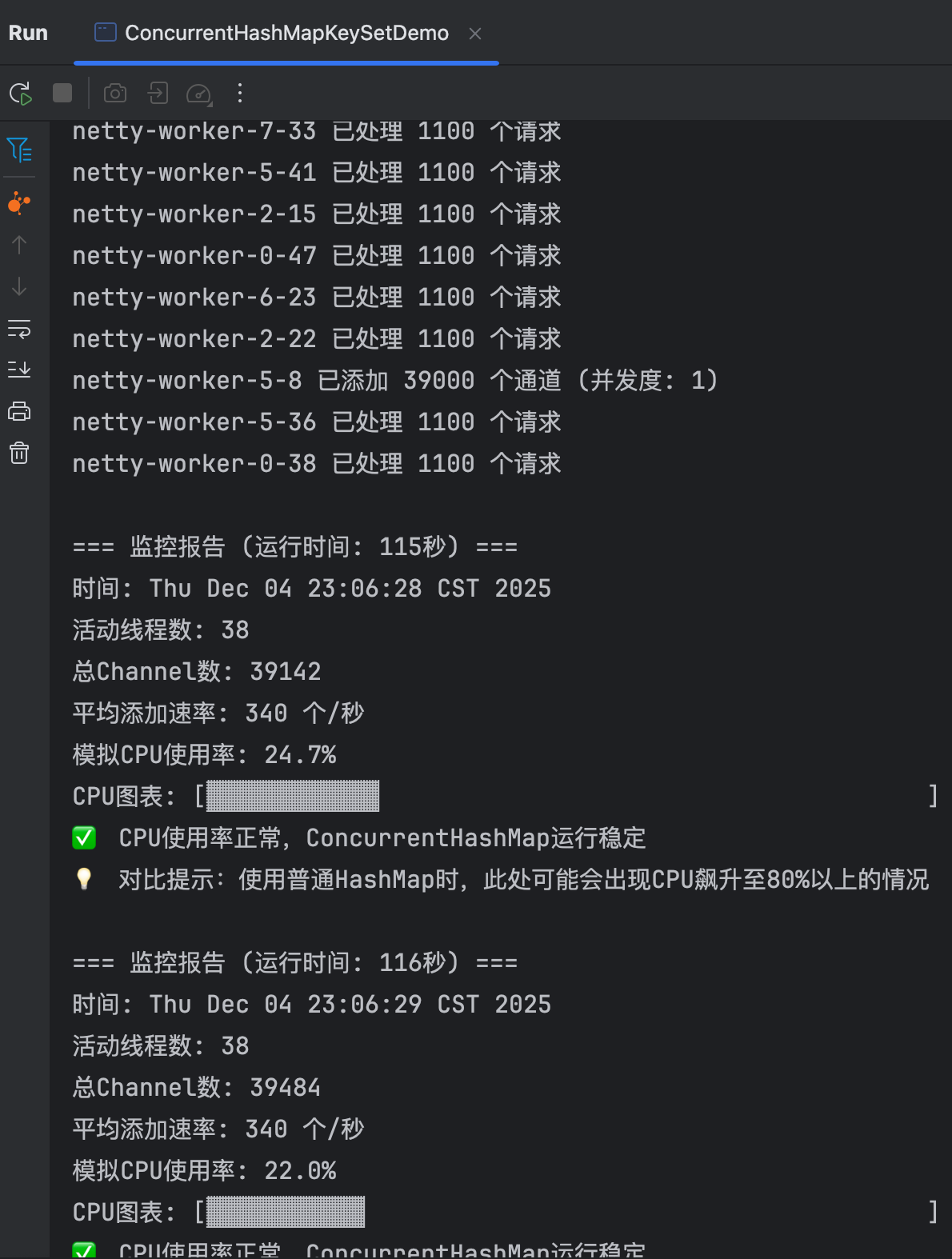
以上输出省略....
=== 监控报告 (运行时间: 114秒) ===
时间: Thu Dec 04 23:06:27 CST 2025
活动线程数: 38
总Channel数: 38800
平均添加速率: 340 个/秒
模拟CPU使用率: 27.7%
CPU图表: [▓▓▓▓▓▓▓▓▓▓▓▓▓                                     ]
✅ CPU使用率正常,ConcurrentHashMap运行稳定
💡 对比提示:使用普通HashMap时,此处可能会出现CPU飙升至80%以上的情况
netty-worker-7-33 已处理 1100 个请求
netty-worker-5-41 已处理 1100 个请求
netty-worker-2-15 已处理 1100 个请求
netty-worker-0-47 已处理 1100 个请求
netty-worker-6-23 已处理 1100 个请求
netty-worker-2-22 已处理 1100 个请求
netty-worker-5-8 已添加 39000 个通道 (并发度: 1)
netty-worker-5-36 已处理 1100 个请求
netty-worker-0-38 已处理 1100 个请求

=== 监控报告 (运行时间: 115秒) ===
时间: Thu Dec 04 23:06:28 CST 2025
活动线程数: 38
总Channel数: 39142
平均添加速率: 340 个/秒
模拟CPU使用率: 24.7%
CPU图表: [▓▓▓▓▓▓▓▓▓▓▓▓                                      ]
✅ CPU使用率正常,ConcurrentHashMap运行稳定
💡 对比提示:使用普通HashMap时,此处可能会出现CPU飙升至80%以上的情况

=== 监控报告 (运行时间: 116秒) ===
时间: Thu Dec 04 23:06:29 CST 2025
活动线程数: 38
总Channel数: 39484
平均添加速率: 340 个/秒
模拟CPU使用率: 22.0%
CPU图表: [▓▓▓▓▓▓▓▓▓▓▓                                       ]
✅ CPU使用率正常,ConcurrentHashMap运行稳定
💡 对比提示:使用普通HashMap时,此处可能会出现CPU飙升至80%以上的情况

=== 监控报告 (运行时间: 117秒) ===
时间: Thu Dec 04 23:06:30 CST 2025
活动线程数: 38
总Channel数: 39825
平均添加速率: 340 个/秒
模拟CPU使用率: 24.3%
CPU图表: [▓▓▓▓▓▓▓▓▓▓▓▓                                      ]
✅ CPU使用率正常,ConcurrentHashMap运行稳定
💡 对比提示:使用普通HashMap时,此处可能会出现CPU飙升至80%以上的情况
netty-worker-7-33 已添加 40000 个通道 (并发度: 1)

=== 监控报告 (运行时间: 118秒) ===
时间: Thu Dec 04 23:06:31 CST 2025
活动线程数: 38
总Channel数: 40168
平均添加速率: 340 个/秒
模拟CPU使用率: 23.4%
CPU图表: [▓▓▓▓▓▓▓▓▓▓▓                                       ]
✅ CPU使用率正常,ConcurrentHashMap运行稳定
💡 对比提示:使用普通HashMap时,此处可能会出现CPU飙升至80%以上的情况

=== 监控报告 (运行时间: 119秒) ===
时间: Thu Dec 04 23:06:32 CST 2025
活动线程数: 38
总Channel数: 40512
平均添加速率: 340 个/秒
模拟CPU使用率: 28.8%
CPU图表: [▓▓▓▓▓▓▓▓▓▓▓▓▓▓                                    ]
✅ CPU使用率正常,ConcurrentHashMap运行稳定
💡 对比提示:使用普通HashMap时,此处可能会出现CPU飙升至80%以上的情况

=== 演示结束 ===
最终Channel数: 40667
无法获取ConcurrentHashMap内部信息: map

=== 线程执行统计 ===
完成线程数: 0/35
netty-worker-2-46 被中断
netty-worker-5-41 被中断
netty-worker-9-11 被中断
// 省略....

✅ 验证完成:ConcurrentHashMap.newKeySet() 在并发环境下表现稳定
💡 关键优势:
  1. 线程安全,无需外部同步
  2. 高并发下性能稳定
  3. 避免HashMap树化导致的CPU飙高
  4. 适合高频并发写入场景

Process finished with exit code 0
4.3 业务代码优化
部分核心代码实现
import com.google.common.collect.Maps;
import lombok.extern.slf4j.Slf4j;
import org.springframework.util.CollectionUtils;

import java.util.*;
import java.util.concurrent.ConcurrentHashMap;

@Slf4j
public class OptimizedClientChannelHolder {

    /**
     * 用户级别channel缓存
     * key: orgCode+user+plate
     * value: 线程安全的ChannelWrapper集合
     */
    private static final Map<String, Set<ChannelWrapper>> userChannels = Maps.newConcurrentMap();

    /**
     * 添加用户Channel(线程安全版本)
     */
    public void addUserChannel(String userKey, ChannelWrapper userChannelWrapper) {
        // 线程安全的computeIfAbsent + ConcurrentHashMap.newKeySet()
        Set<ChannelWrapper> userChannelWrappers = userChannels.computeIfAbsent(
            userKey,
            k -> ConcurrentHashMap.newKeySet()  // 创建线程安全的Set
        );

        // 线程安全的添加操作
        boolean added = userChannelWrappers.add(userChannelWrapper);

        if (added) {
            try {
                // 缓存到Redis
                redisUtil.addChannelInfo(userKey, channelWrapper4Json(userChannelWrapper));
                redisUtil.addServerChannel(userChannelWrapper.getServerIp(), userKey);

                log.info("用户级别通道-添加本地通道:{}", JSON.toJSONString(userChannelWrapper));

                // 监控指标
                Metrics.counter("channel.add.success", "userKey", userKey).increment();
            } catch (Exception e) {
                log.error("Redis缓存失败,回滚本地缓存", e);
                userChannelWrappers.remove(userChannelWrapper);
                Metrics.counter("channel.add.redis_failure").increment();
                throw new RuntimeException("添加Channel失败", e);
            }
        } else {
            log.warn("Channel已存在,无需重复添加: {}", userChannelWrapper.getChannelId());
            Metrics.counter("channel.add.duplicate").increment();
        }
    }

    /**
     * 获取用户的所有Channel(返回副本保证线程安全)
     */
    public List<ChannelWrapper> getUserChannels(String userKey) {
        Set<ChannelWrapper> channelSet = userChannels.get(userKey);
        if (CollectionUtils.isEmpty(channelSet)) {
            return Collections.emptyList();
        }

        // 返回副本,避免外部修改影响内部数据结构
        return new ArrayList<>(channelSet);
    }

    /**
     * 删除用户Channel(线程安全)
     */
    public boolean removeUserChannel(String userKey, ChannelWrapper channelWrapper) {
        Set<ChannelWrapper> channelSet = userChannels.get(userKey);
        if (channelSet == null) {
            return false;
        }

        boolean removed = channelSet.remove(channelWrapper);
        //省略...
    }

    /**
     * 批量操作优化
     */
    public void batchAddChannels(String userKey, List<ChannelWrapper> channels) {
        if (CollectionUtils.isEmpty(channels)) {
            return;
        }

        Set<ChannelWrapper> userChannelWrappers = userChannels.computeIfAbsent(
            userKey,
            k -> ConcurrentHashMap.newKeySet()
        );

        // 批量添加
        int addedCount = 0;
        for (ChannelWrapper channel : channels) {
            if (userChannelWrappers.add(channel)) {
                addedCount++;
            }
        }

        if (addedCount > 0) {
            // 批量写入Redis
            batchUpdateRedis(userKey, channels);
            log.info("批量添加{}个Channel到用户: {}", addedCount, userKey);
        }
    }

    /**
     * 安全迭代器(避免ConcurrentModificationException)
     */
    public void processUserChannels(String userKey, Consumer<ChannelWrapper> processor) {
        Set<ChannelWrapper> channelSet = userChannels.get(userKey);
        if (channelSet == null) {
            return;
        }

        // 使用toArray或stream避免ConcurrentModificationException
        channelSet.stream().forEach(processor);
    }
}
五、写在最后
本次高并发场景下的CPU飙高问题,根源在于误用非线程安全的LinkedHashSet存储Channel连接,引发底层HashMap树化竞争,最终导致CPU资源持续飙高。
后续优化方向:
- 加强代码审查code review,推进常态压测,定期执行性能压测,提前发现潜在瓶颈。
日常开发情况下,要注重代码质量与线程安全合理性。每一次故障都是系统走向成熟的重要一课。